v2rayN docs
This page explains the client. Servers, subscriptions, and keys are yours to provide. This site does not host them.
Quick start
- On the download page, get the package for your system. The current build is pre-release 7.25.2.
- On Windows and Linux, unpack the archive and open the program. On macOS, open the dmg and move the app to Applications.
- In the client, import your own share link, QR code, or subscription. This site does not provide servers or subscriptions.
- Start it in the window, then turn on the system proxy if you need it.
Supported cores and protocols
A flexible choice of cores, and broad protocol support
v2rayN brings different proxy cores and protocols into one graphical window. Choose a core that fits the profile and how you use it, and manage those connections in one client instead of switching between several apps.
Core support
Xray
Used for many common proxy protocols, and one of the main cores in v2rayN.
Profile types: VLESS · VMess · Trojan · Shadowsocks · Hysteria2 · WireGuard · SOCKS · HTTP
sing-box
Broad protocol compatibility for many kinds of proxy profiles.
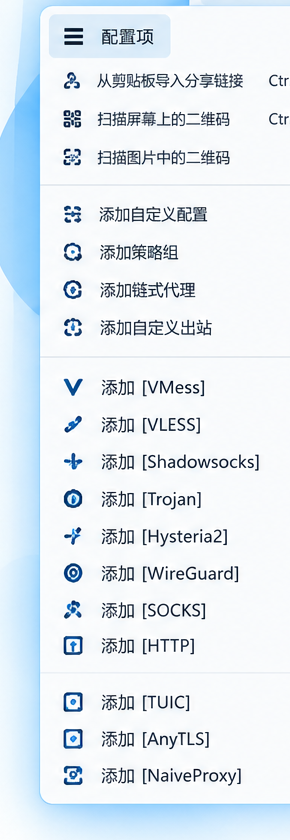
Profile types: VLESS · VMess · Trojan · Shadowsocks · Hysteria2 · TUIC · AnyTLS · Naive · WireGuard · SOCKS · HTTP
TUIC, AnyTLS, and Naive belong with sing-box, not with Xray. Release builds include cores such as Xray, sing-box, and mihomo, and other cores can be downloaded separately. The two cards above show how profile types map. They are not every core v2rayN can use.
How cores and protocols relate
v2rayN
 v2rayN
Core
Protocol
Protocol support
VLESS
A flexible proxy protocol. It can be used with different transports and security settings.
VMess
A protocol v2rayN has supported for a long time.
Trojan
Supports TLS and related connection settings.
Shadowsocks
A widely used proxy protocol, with several encryption methods.
Hysteria2
A QUIC-based proxy protocol for the networks it is meant for.
TUIC
A protocol type supported by the sing-box core.
WireGuard
Supports WireGuard connection profiles.
SOCKS / HTTP
Common standard proxy profiles.
AnyTLS
A protocol type supported by the sing-box core.
Naive
A profile type supported by the sing-box core.
One window
Whichever supported protocol a profile uses, v2rayN keeps servers, subscriptions, routing, DNS, and proxy settings in the same client window, so different profiles are managed the same way. Parameters come from your own profile. This site does not provide servers or ready-to-deploy configs.
Configuration
From a simple connection to more flexible network setup
v2rayN is more than a way to connect to a server. Servers and subscriptions, routing, DNS, the system proxy, and TUN mode can all be set in the same client window.
Keep the defaults and start quickly, or adjust the connection for your network. The matching options are in the client.
Servers and subscriptions
Keep connection profiles together, so day-to-day upkeep stays simple.
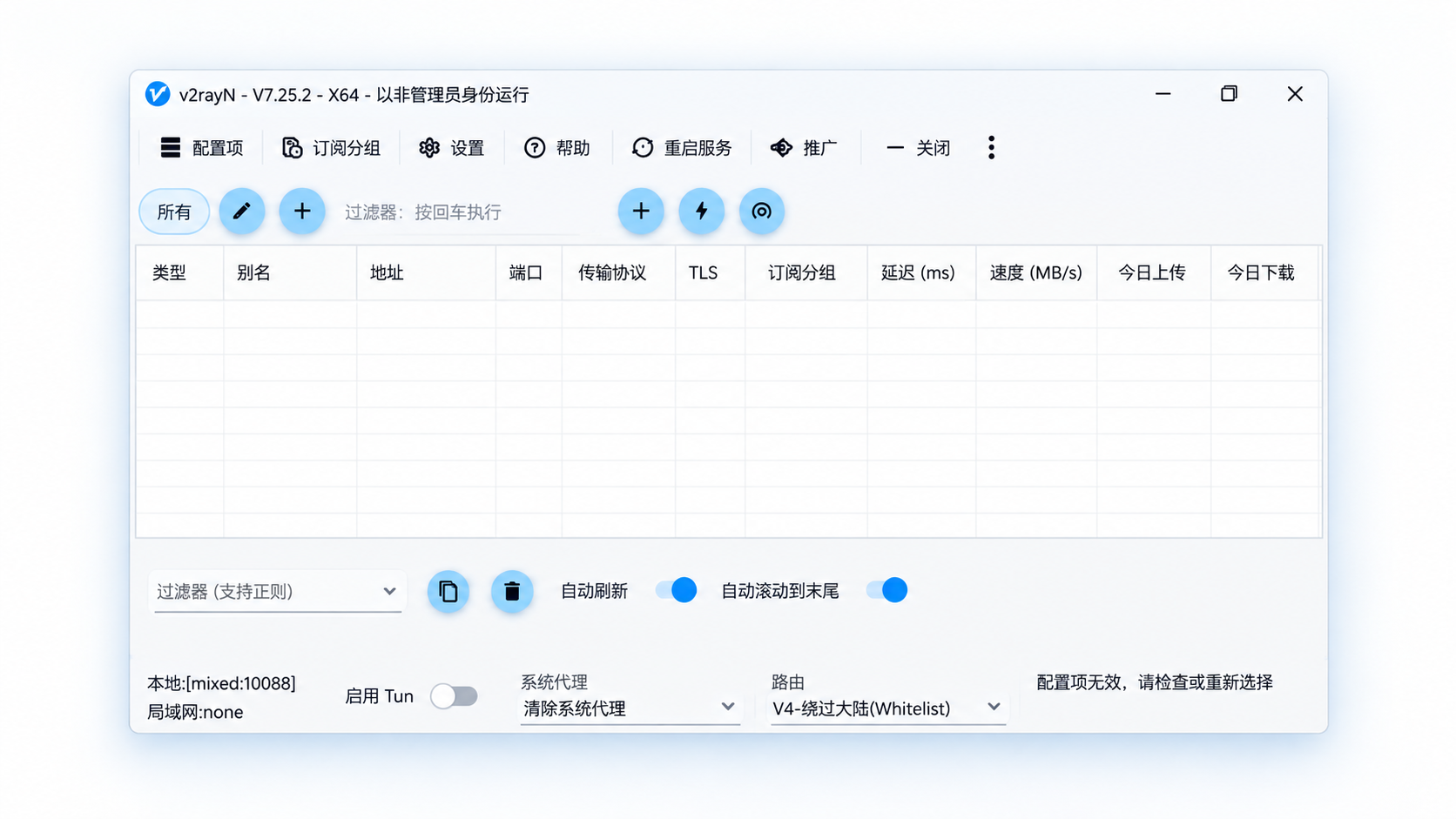
Import a profile from a share link or a QR code, or add and manage servers by hand. Subscriptions keep profiles from different sources in one place, and you can refresh them when you need to.
Flexible routing
Send different traffic through different rules.
Routing lets you choose how traffic is handled. Connections that should use the proxy go through it. The rest follow the matching rule.
DNS
Adjust name resolution for the network you are on.
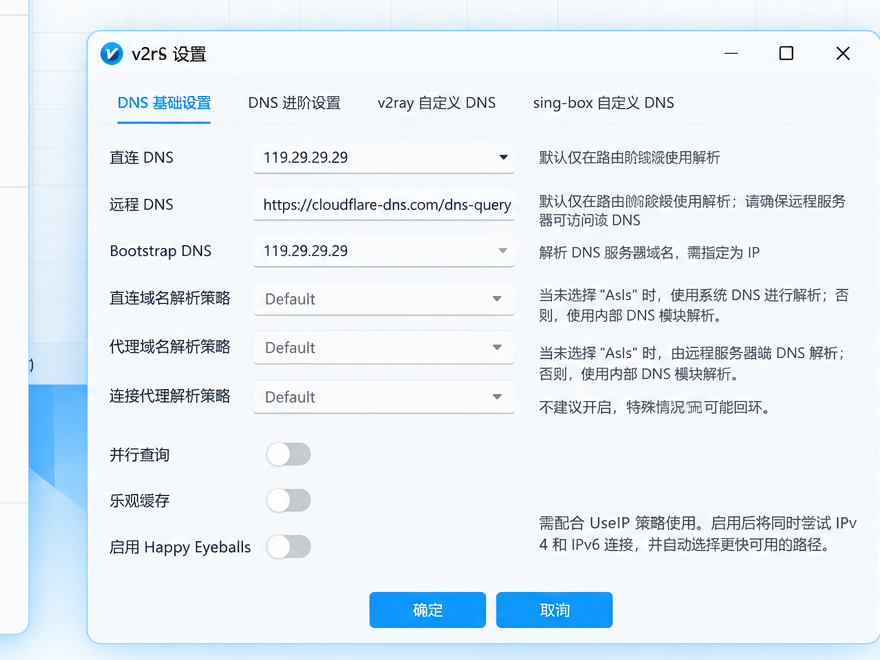
v2rayN includes DNS settings for different connection cases, and they work together with the proxy and routing configuration.
In the client you can manage direct DNS, remote DNS, bootstrap DNS, and the related resolution policies.
System proxy
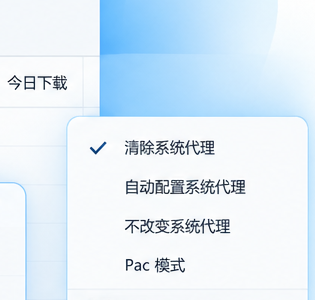
Choose a system proxy mode for how you use the client.
v2rayN can set the system proxy automatically, leave the current system settings as they are, clear the system proxy, or use PAC mode.
That covers one-step everyday use, and leaves room for other networks.
TUN mode
Handle more application traffic in one place.
Besides the usual system proxy, TUN mode can handle more kinds of network traffic, and routing rules still decide what happens to each connection.
If you only need a basic proxy, stay with the regular mode. Turn on and configure TUN when you need broader traffic handling for that environment.
Parameters come from your own profile. This site does not provide servers, and it does not store or fill in subscriptions.
FAQ
What is v2rayN?
v2rayN is a graphical client for Windows, macOS, and Linux. It manages cores such as Xray and sing-box, and keeps servers, subscriptions, routing, and network settings in one window.
Is v2rayN free?
Yes. v2rayN is open source, and the project is hosted on GitHub.
Which operating systems does v2rayN support?
v2rayN currently has desktop builds for Windows, macOS, and Linux. Download the build that matches your system and processor. Packages follow the current GitHub Releases.
Does v2rayN include servers or a subscription?
No. v2rayN is the client. It imports, manages, and uses connection profiles. You provide the server, subscription, or other connection details. This site does not host them.
Which cores and protocols does v2rayN support?
v2rayN supports cores such as Xray and sing-box, and can manage profile types including VLESS, VMess, Trojan, Shadowsocks, SOCKS, and HTTP. Support can change with the core and the release. See supported cores and protocols.
How do I import a server profile?
Add a profile from a share link, a QR code, or a subscription, or create one by hand for the protocol you use. After it is imported, it appears in the server list.
What is a subscription, and how do I update it?
A subscription collects and maintains several server profiles. Add your own subscription address in v2rayN, then refresh it to pick up the latest profiles instead of editing each server by hand. This site does not fill in or store subscriptions.
Why is there still no network access after I add a profile?
Check that the profile is valid, a server is selected, the core started, and the system proxy or TUN mode is on for the way you are using the client. If it is still failing, read the client log and the core log. Issues in v2rayN itself are mainly in guiLogs. Core output is available from the information area in the main window.
What is the difference between the system proxy and TUN mode?
The system proxy uses the operating system’s proxy settings for apps that follow them. TUN mode uses a virtual network interface and can cover a wider range of traffic. For everyday use, start with the system proxy. Look at TUN mode when a specific app or a more involved traffic setup needs it.
Why do some apps ignore the system proxy?
Apps do not all honor the operating system proxy. Some keep their own network settings. Check that app’s proxy options, or consider another way to handle its traffic. System proxy behavior also differs by operating system.
Why is there no internet after TUN mode is turned on?
TUN depends on a virtual adapter, DNS, routing, the core, and the operating system’s network setup, so more than one thing can be involved. Confirm you are on the current release, then check the TUN, DNS, and routing settings and read the logs. There is no single fix for every environment.
How should TUN mode and DNS be set?
DNS is tied to TUN, the core, and routing. No single setup fits every network. v2rayN includes direct DNS, remote DNS, and related advanced settings. If name resolution fails, check the core you are using, the operating system, and the logs.
What do routing rules do?
Routing rules decide which outbound connection handles each kind of traffic. For example, traffic that matches a rule can use the proxy, while other traffic uses a different connection.
The macOS “set system proxy automatically” option did nothing. What now?
On macOS, automatic system proxy setup runs a script. If that script does not succeed on the machine, check the related entries in guiLogs.
Can other devices on the LAN connect through v2rayN?
You can allow LAN connections in settings, then set the listen port, the firewall, and the proxy settings on the other devices. This exposes the service to other devices on the LAN, so keep the network and who can reach it in mind.
Can I run more than one v2rayN at the same time?
The portable build can be copied into separate folders and run as more than one instance. Each instance needs its own local listen port so they do not conflict.
Will updating v2rayN erase my profiles?
Back up important profiles and client data before you update. Where that data lives can differ by package, install method, and major version. Read the release notes for the version you are moving to.
What should I include when I report a problem?
Include the v2rayN version, the operating system version, the core, the steps to reproduce the problem, and the logs. For issues in the window, settings, speed test, or updates, check guiLogs. For core problems, also include the core output. “It does not work” alone is usually not enough to find the cause.
If you do not have the client yet, download the build for your system.